


Beauty Camera - Selfie Camera
4.9230.00 Reviews
App Specs
- Version
- 3.3.0
- Updated On
- License
- Free
- Downloads
- 10,000,000+
- Developer
- Mobile_V5
- Categories
- Beauty
- Platform
- Android, iOS
Screenshots
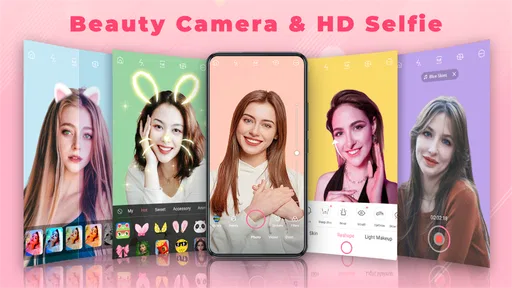
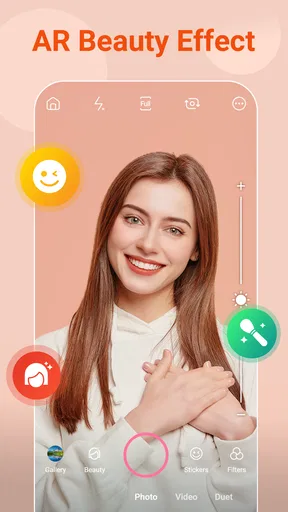
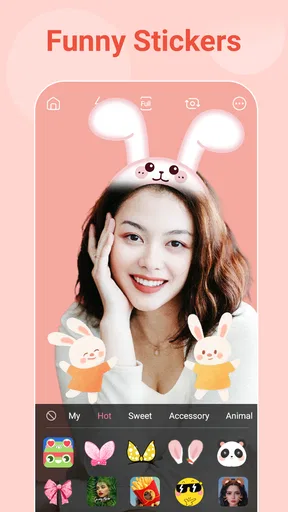
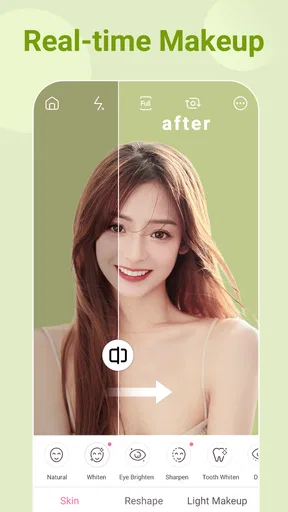
 Analysis by AppCompare
I usually reach for a selfie camera when I want a quick, flattering photo without opening a separate editor afterward. Beauty Camera - Selfie Camera is aimed squarely at that routine: it combines a live camera preview with beauty effects, filters, stickers, and makeup-style options. I’d treat it as a playful portrait tool rather than a replacement for a full photo editor, and that distinction matters when deciding whether it belongs in your everyday camera rotation.
Who will get the most from it
This beauty app makes the most sense for someone who takes casual portraits and likes to make small adjustments before sharing them. If you often take a selfie in changing indoor light, want to compare a few looks, or simply enjoy trying a different makeup style on screen, having those choices close to the camera can save a few steps. It is also approachable for people who do not want to learn a complicated editing workflow before making a simple photo look more polished.
I would be more cautious if you want precise retouching, dependable color correction, or a natural-looking result that must match a professional brief. Dedicated photo editors generally offer more control over individual adjustments, while a phone’s built-in camera is usually the simpler choice for an unfiltered snapshot. Beauty Camera sits between those options: convenient and expressive, but designed around selfie effects rather than detailed photographic work.
A practical routine, not just a filter demo
Imagine taking a quick selfie before joining a video call or heading out to meet a friend. Instead of taking several pictures and editing each one afterward, you can preview an effect, make a restrained adjustment, and decide whether the image still looks like you. My practical tip is to compare the preview with the unedited view before saving. A small change can be flattering on the screen yet look much stronger once you see the finished image at full size.
For a set of profile photos, consistency is more useful than choosing the most dramatic effect each time. I would pick one subtle look, keep the lighting and distance from the camera similar, and take a few options before changing styles. This makes the results easier to compare and avoids a batch of portraits that look as if they came from different sessions. If the goal is a realistic headshot, though, I would skip face-shaping effects and use a plain camera with good natural light.
First Impressions
From the moment I opened the app, I was greeted with a clean and intuitive interface. It’s super user-friendly, which is great if you’re like me and don’t want to spend hours figuring out how to use something. The main screen gives you easy access to all the features, and everything is just a tap away. I love how the developers have kept it simple yet packed with features.
Features Galore
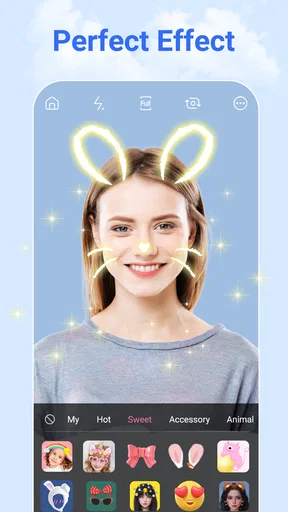
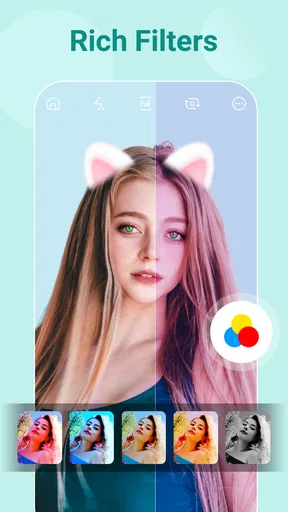
Let’s dive into the features because there’s a lot to unpack here. The app boasts a bunch of filters and effects that can instantly enhance your selfies. You can choose from a variety of options, from subtle enhancements to dramatic changes. One of my favorites is the "Natural" filter, which gives your selfie a gentle touch-up without making it look overdone. For those days when you want to go all out, there are bolder filters that add a fun twist to your snaps.
Worth Reading Before You Choose

Baby Panda World Brings Quick Play to Modern Phones, but Its Game Library Feels Busy

ESPN’s Live Game View Makes Following Close Games Easier

QuizzLand Review: A Good Fit for Short Trivia Breaks, Not Every Player

Basketball Stars: Multiplayer Is Fast, but Can It Recover When Matches Go Wrong?

WEBTOON Turns Phone Updates Into a Better Reading Routine

Link to Windows Runs on Shared Habits, Not Social Feeds
Another cool feature is the real-time beauty effects. You can adjust your skin tone, smoothness, and even add a bit of blush—all before you take the picture. It’s like having a Snapchat filter but with more control and precision. And if you’re worried about looking too artificial, there’s a handy slider to adjust the intensity of each effect.
Choosing effects with a light touch
The live preview is useful because it lets you judge the overall look before committing to a photo. I would not assume that every adjustment will behave equally well in every scene: strong smoothing or face-shaping can be more noticeable in close-ups, and uneven light can make a preset feel heavier than expected. A useful approach is to start with the least intense setting, then increase it only if the preview still looks too close to the original for your taste.
There is also a practical trade-off between a matching filter and a natural skin tone. A filter can create a coherent mood, but it may shift the appearance of makeup or the surrounding colors. If you are taking pictures to show a specific lipstick or eyeshadow, check the preview against the real shade rather than assuming the effect preserves it faithfully. For a playful portrait, that shift may be part of the fun; for a product or makeup reference photo, a standard camera may give a more useful record.
Editing Tools
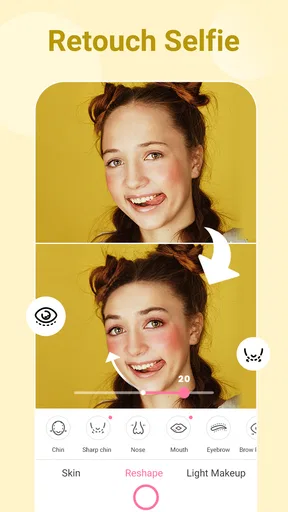
Post-snap editing is where the app gives you more room to shape the result. You’ve got a full suite of editing tools at your disposal. Whether it’s cropping, rotating, or tweaking the brightness and contrast, everything is here. For those who love details, the app also offers tools like eye enlargement, face slimming, and even teeth whitening. It’s like having your personal glam squad at your fingertips.
The app also supports makeup features that let you apply virtual cosmetics. From lipsticks to eye shadows, you can try out different looks without the hassle of washing it all off later. It’s a fun way to experiment with new styles and see what suits you.
Editing with a clear stopping point
When I retouch a portrait, I find it helpful to decide what the photo is for before editing. A casual message to friends can handle a more playful treatment; a work profile photo benefits from a lighter hand. Cropping and brightness changes are often the first adjustments worth checking because they can improve readability without changing facial features. I would save stronger face edits for images where a stylized result is the point, rather than treating them as a default.
Virtual makeup is best viewed as a way to explore a look, not as a guarantee of how cosmetics will appear in person. Screen brightness, room lighting, and the original photo all influence what you see. If you are comparing two possible styles, take them in the same light and with the same framing; otherwise, it is hard to tell whether you prefer the makeup or simply the different conditions. That small bit of discipline makes the feature more useful than rapidly tapping through effects.
Trust, privacy, and the choices that matter
A beauty camera handles images of your face, so I would make a quick privacy check part of setting it up. The details I can responsibly assess here do not establish a complete picture of its permissions, data handling, or account controls, so I would not infer that photos stay only on your device or that any particular information is collected. Before granting access, read the permission prompts on your phone and allow only what makes sense for the task you want to do.
For a one-off selfie, consider whether the app needs access to your full photo library or whether a narrower choice is available in your operating system’s prompt. When you finish, check the image in your regular gallery and decide whether you want to keep it there; avoid using a face photo for anything you would not be comfortable sharing. These are sensible habits for any camera or editing app, not evidence of a specific problem with this one.
It is also worth separating “easy to use” from “transparent about data.” A simple interface can make editing feel effortless, but it does not answer questions about storage or processing. If those details are important to you, inspect the app’s current permission screen and privacy information before taking personal or sensitive portraits. If you cannot find answers you are comfortable with, the phone’s built-in camera is a reasonable alternative for a basic selfie.
Sharing Your Masterpiece
Once you’ve perfected your selfie, sharing it with the world is a breeze. The app integrates seamlessly with social media platforms like Instagram, Facebook, and Snapchat. Just a couple of taps, and your masterpiece is out there for all to see. It’s perfect for those who love to keep their feed updated with fresh content.
And if you’re someone who likes to keep their photos organized, the app allows you to save your edited photos directly to your gallery. You can even create albums within the app to keep track of your transformations over time.
Saving and sharing deliberately
Before sharing, I would review the saved version rather than relying only on the live preview. Check the crop, brightness, and intensity on the actual image, especially if you plan to post it somewhere that compresses photos. Saving first also gives you a moment to decide whether you want to keep the edited portrait, make another version, or share nothing at all. That is a simple workflow, but it prevents an impulsive tap from becoming a public post.
If you are making several versions, give them clear names or keep them together in a dedicated album so you can tell the original from the retouched copies later. This is particularly helpful when you want to compare a natural edit with a more dramatic one. For people who mainly want private snapshots, the social-sharing route is optional; the app’s value can still be in trying the look and saving the result for yourself.
Where it fits among camera apps
Compared with the standard camera app, Beauty Camera puts cosmetic effects and portrait adjustments closer to the moment of capture. That can make a quick selfie feel more convenient, especially when you already know you want a filter or makeup effect. The trade-off is that a normal camera is usually the more straightforward choice for unaltered photos, while an editor built for broader photography gives you more control over the image beyond the face.
As an app from Mobile_V5 in the beauty category, it has broad reach: it is free, rated for Everyone, and has passed ten million installs. Its average rating is 4.8 from around 37,000 ratings, which suggests many people find the basic idea appealing, though popularity does not settle whether its style suits you. It was released on July 5, 2023, and version 3.2.6 is listed for Android 6.0 and later. Those details make it easy to judge basic compatibility, but I would still check the current app screen on your own device before relying on any particular workflow.
The Final Verdict
Overall, Beauty Camera - Selfie Camera is a fantastic app for anyone who loves taking selfies or wants to enhance their photo editing game. With its wide range of features and easy-to-use interface, it’s definitely worth checking out. Whether you’re looking for a quick touch-up or a full-on makeover, this app has got you covered. It’s become my go-to tool for snapping selfies, and I’m sure it’ll become yours too!
If you’re curious to try it out, you can find Beauty Camera - Selfie Camera available for download on both Android and iOS. Happy snapping!
A measured recommendation
I would recommend trying it if your main goal is an easy, expressive selfie and you enjoy choosing among filters, live beauty effects, and virtual makeup. It is less compelling if you want an untouched camera, highly precise retouching, or clear answers about image handling before you begin. In those cases, a built-in camera or a more specialized editor may fit better.
My simplest advice is to test it with an ordinary, non-sensitive photo first. Try one subtle look and one stronger treatment, compare the saved images, and decide whether the editing style feels right to you. If you like the results and are comfortable with the permission choices shown on your phone, it can be a handy tool for quick portraits; if not, there is no need to make it part of your routine.
Pros
- User-friendly interface for quick edits.
- Wide range of filters and effects.
- Real-time beauty enhancements.
- High-quality photo output.
- Minimal ad interruptions.
Cons
- Limited features in free version.
- Occasional app crashes reported.
- Watermark on free version images.
- Slow performance on older devices.
- In-app purchases can be pricey.
FAQs for Beauty Camera - Selfie Camera
What features does Beauty Camera - Selfie Camera offer?
Beauty Camera - Selfie Camera provides a range of features designed to enhance your selfies and photos. These include real-time beauty effects, filters, and editing tools that allow you to adjust skin tone, whiten teeth, and add makeup effects. The app also offers background blur options and a collage maker for creative layouts.
Is the Beauty Camera app free to use?
Beauty Camera - Selfie Camera is free to download and offers a variety of features at no cost. However, it may offer in-app purchases for premium features or ad-free experiences. Users can choose to buy these additional features if they want to enhance their editing capabilities.
How user-friendly is the interface of Beauty Camera - Selfie Camera?
The interface of Beauty Camera - Selfie Camera is designed to be intuitive and user-friendly. Even beginners can easily navigate through its features. With clearly labeled icons and straightforward editing tools, users can quickly apply filters and effects to their photos without a steep learning curve.
Does Beauty Camera - Selfie Camera support high-resolution photos?
Yes, Beauty Camera - Selfie Camera supports high-resolution photos. This ensures that your edited selfies and photos maintain their quality and sharpness after applying effects and filters. The app is optimized to handle high-quality images without significant loss of detail.
Is Beauty Camera - Selfie Camera safe to download and use?
Beauty Camera - Selfie Camera is generally safe to download and use. It is available on the official app stores, which follow strict guidelines to ensure safety. However, as with any app, users should review permissions and privacy policies to ensure they are comfortable with the data usage and sharing practices.


